Free esports ID card maker: roster to print-ready cards
Type or paste your team list and get a printable ID card for every person. Free, no sign-up, and it runs in your browser.
Make your esports ID cards
Start here: open the ID card maker
Free, works in your browser, no account. It opens with example people so you can see how it works, then you add your own.
Why use this esports ID card maker
Roster to cards in one go
Paste rows copied from Excel or Google Sheets, or upload a CSV, and every person gets a card with their team, role and design. Teams are created from the sheet.
A QR that works at the gate
Each card can carry a signed QR code. The gate scanner rejects copies and edited roles, and the same roster feeds check-in on the day, so you do not enter anyone twice.
Print-ready, and private
A4 or US Letter sheets with crop marks, optional 3 mm bleed and mirrored backs. The names and photos you type stay in your browser and are not sent to our servers.
How to use the esports ID card maker
- 1Name your event, choose the game and a card shape, and list your teams.
- 2Paste your roster rows from a spreadsheet or upload a CSV, then add photos where you want them.
- 3Pick a design for each team and keep the signed QR code switched on.
- 4Download the print-ready PDF (A4 or US Letter) or a zip of PNG pictures, and make the check-in pack for the gate phone.
Who this esports ID card maker is for
It is made for the person who has a list of players and a date. Typical users are:
- College esports clubs and fest committees running a campus tournament.
- Organisers of BGMI, Free Fire, Valorant and CS2 tournaments, for teams, substitutes, coaches and managers.
- LAN events, where a printed badge on a lanyard gets people through the door and into the right zone.
- Online events, where a phone-screen digital pass can be shared as a picture.
These are event passes. They are not school, college or government identity documents. For the fields that make a good card, see how to design a tournament ID card.
From a roster to cards in one go
On the People step, open Import a sheet and paste rows copied from Excel or Google Sheets, or upload a CSV. The columns are name, team, role, dob, gender and zones, and a header row is optional. Teams that are not in the event yet are made for you, and a blank template is one click away.
Each person gets one of eleven roles (Player, Substitute, Coach, Manager, Staff, Guest, Caster, Media, VIP, Organiser or Volunteer), so staff and guests can look different from players. The list flags people who look like duplicates, and you can export the whole roster back to CSV. Add a photo to a person by hand where you need one. Each team gets its own design, with an optional team logo, and you can edit any design.
A QR code and check-in that belong together
With signing on, the QR code on the card holds the event code, the person's card ID and a signature made from your passphrase. It does not hold their name, photo or date of birth. If someone copies a card, edits the role or reuses a pass from another event, the signature no longer matches and the gate check-in scanner rejects it.
On the Print step you can make an offline check-in pack and load it on one gate phone. A free account is only needed if you want to save the event online and check people in live across several doors. Keep the passphrase among the organisers, because anyone who knows it can make valid passes. Read how gate check-in works before the day.
Print sheets: sizes, crop marks and bleed
The Print step has seven card shapes. The wallet card is 85.6 x 54 mm, the credit-card size that print shops call CR80. The others are a lanyard badge (54 x 85.6 mm), an event badge (76 x 102 mm), a wristband strip (190 x 22 mm), a poster card (70 x 105 mm), a story card (60 x 106.7 mm) and a phone-screen digital pass.
The PDF puts every card at its real size on A4 or US Letter pages; in the default layout 8 wallet cards fit on one A4 page. You can switch crop marks on or off, add 3 mm of bleed so a print shop can trim without white edges, choose a roomy layout, a tight layout with no gaps for pre-cut or perforated stock, or set your own gap and margin. Backs go on their own pages, mirrored so a double-sided print lines up when you flip on the long edge. You can also download every card as a PNG in one zip, or use the browser's Print button. Print at 100 percent and test one page on plain paper first. We do not print or post cards for you.
Privacy: what stays in your browser
The maker runs in your browser. The names and photos you add are used there and are not sent to our servers. The browser remembers your card designs, team names and event details between visits, but people and photos are not kept: closing the tab removes them, so use Save project to download your own copy as a file. The signing passphrase is left out of that file unless you ask for it.
Scanning an Aadhaar card is optional, needs the holder's permission and happens on your device. Only the last four digits of the number are kept, and a full number in an imported sheet is cut down to the last four. Collect an ID number only when your event really needs one, and keep it off the printed card. Text recognition and photo background removal download their helper files from public content delivery networks. The optional free account, if you use it, stores the event on our server. The privacy page has the full detail.
Real sample cards from the maker
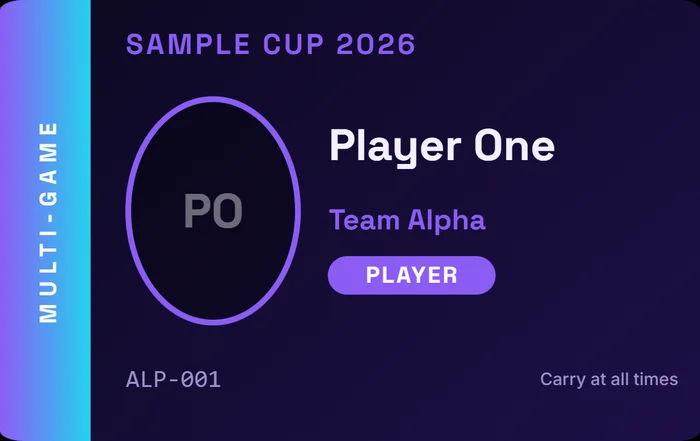
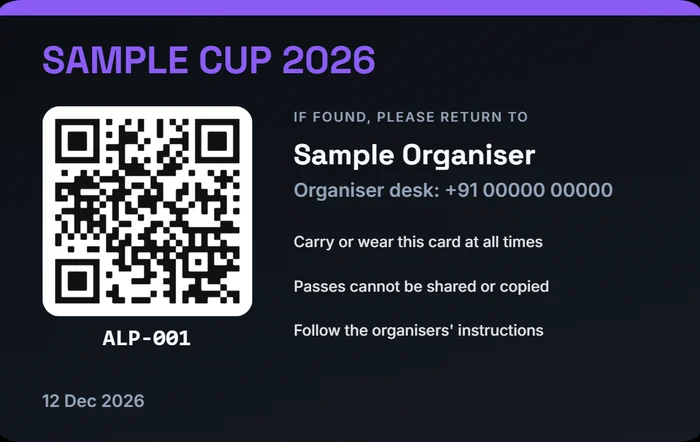
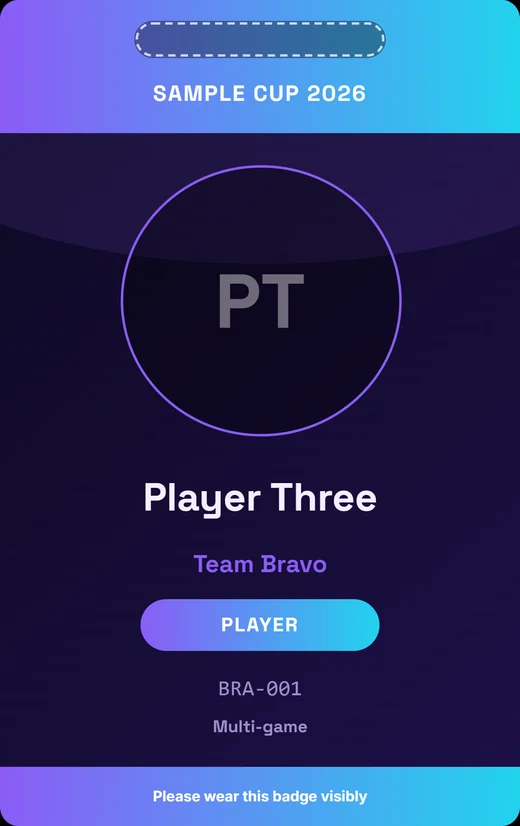
These three pictures were exported from the maker itself, with placeholder names, a placeholder organiser and a sample passphrase. The QR code on the back is a real signed pass for the sample event.
How it compares: an honest table
Last checked 15 Nov 2026; check each site for current terms. We read one page of each tool and wrote down only what it said. "Not checked" means the fact was not in the text we read. It does not mean the feature is missing. The full write-up, with a decision guide, is best free esports ID card makers compared.
| Tool | Free? | No sign-up? | Whole roster in one go | QR code | Print-ready sheet | Built for tournaments (check-in) |
|---|---|---|---|---|---|---|
| Esports Hub (this page) | Yes | Yes | Yes: paste rows or upload a CSV | Yes: signed | Yes: A4 or US Letter, crop marks, optional bleed | Yes: gate scanner and offline check-in pack |
| Canva | Free templates and editor (page not read) | Not checked | Not checked | Not checked | Not checked | No: a general design tool with ID card templates |
| Template.net | Mentions free | Not checked | Mentions bulk | Mentions QR | Mentions print | No: general sports and ID templates |
| MuftTools (India) | Not checked | Yes, says no sign-up | Yes: bulk from Excel or CSV | Yes | Yes: CR80 size, A4 PDF with 10 cards per sheet and crop marks | No: generic school and employee IDs |
| Themiku (India) | Not checked | Not checked | Yes: bulk | Yes: QR or barcode | Not checked | No: generic templates, front and back |
| BotCamp | Not checked | Yes, says no sign-up | No: one personal card | Not checked | Not checked | No: a gamer licence or profile card for CODM, Free Fire and PUBG (name, UID, level, K/D) |
| StyleNameLab | Not checked | Not checked | No: one personal card | Not checked | Not checked | No: a gaming profile card generator |
| IDCreator | No: a paid print-ordering service | Not checked | Not checked | Not checked | You order printed cards from them | Not checked: offers gamer ID card templates |
Free and no sign-up are not unique to us. What this tool adds is the link to the tournament: one roster feeds the cards, the QR and the gate check-in.
Where this tool is weaker
Better you know before you start:
- Fewer free design templates than Canva. There are 23 card designs (ten classic, thirteen poster-style) that you can edit, but if you want fully custom artwork, Canva is the better tool.
- No AI art. Cards use your colours, team logos and photos, not generated images.
- No printed-card shipping service. You download the PDF or pictures and print them yourself or at a local print shop. If you want cards printed and posted to you, a print-ordering service such as IDCreator does that.
- Rosters come in by pasting rows or uploading a CSV. An Excel file has to be saved as CSV or copied in first.
Guides that help
- ID cardsBest free esports ID card makers compared (2026)
- Organiser guidePlayer ID cards and passes for esports events: what to put on them
- Organiser guideHow to run check-in at the gate of a gaming event
- Tool guideHow to print ID cards: PVC card printing, shops and printing at home
- Organiser guideHow to run a college esports tournament in India
- Tool guideStudent ID card format: what to put on a college club or event ID card
Related pages
- ID card maker for events and teamsThe same maker with the general event framing: staff, guests and volunteers as well as teams.
- Gate check-in scannerScan the signed QR on a printed card at the door, offline or live.
- Student ID card makerFor school clubs, college fests and events, with photo and QR code.
- All free tournament toolsBrackets, points tables, schedules, posters, certificates and more, all free.
Esports ID card maker: questions and answers
Straight answers about how this tool works, what it can and cannot do, and where your data goes.
Is there a free esports ID card maker with no sign-up?
Yes, this one. You can add a roster, pick a design for each team, add a QR code and download a print-ready PDF or PNG pictures without creating an account. The maker runs in your browser. A free account is only needed for extras that need a server, such as saving the event online, inviting players to add their own details and checking people in live across several doors. It is not the right tool for everything: if you want fully custom artwork, a design tool such as Canva suits that better.
How do I make esports ID cards for a whole roster at once?
On the People step, open Import a sheet and paste rows copied from Excel or Google Sheets, or upload a CSV. Use the columns name, team, role, dob, gender and zones; a header row is optional and a blank template is available. Every person gets a card in their team's design, and teams that do not exist yet are created for you. Then add photos where you want them and download one PDF with every card at real size. For very large rosters, use the team filter on the Print step to make the PDF in batches.
Can the QR code on an esports ID card be checked at the gate?
Yes. With signing on, the QR holds an event code, the person's card ID and a signature made from your passphrase. A copied card, an edited role or a pass from another event fails the check at the gate scanner. Make the offline check-in pack on the Print step and load it on one phone, or save the event online with a free account to check people in across several doors. If you turn signing off, the QR holds only the ID number, so it cannot tell a genuine card from a copy.
What size should an esports ID card be, and can I print it on A4?
The wallet card is 85.6 x 54 mm, the credit-card size that print shops call CR80, and it is the usual choice for player cards. For lanyards use the upright badge (54 x 85.6 mm) or the larger event badge (76 x 102 mm). The PDF lays the cards out at real size on A4 or US Letter with optional crop marks and 3 mm bleed, and has a tight layout for pre-cut stock. Print at 100 percent, not fit to page, and test one page on plain paper before the full run.
Where does my players' data go?
The names and photos you add are used in your browser and are not sent to our servers. Designs, team names and event details are remembered in your browser between visits, but people and photos are not, so use Save project to keep a copy as a file. Aadhaar scanning is optional, needs the holder's permission, happens on your device and keeps only the last four digits. If you choose to save an event online with a free account, that event is stored on our server. The privacy page lists everything in full.
How is this different from Canva or a gamer profile card generator?
Canva is a general design tool with ID card templates, and it is the better choice when you want fully custom artwork. Gamer profile card generators such as BotCamp or StyleNameLab make one personal card for one gamer, not a roster. This tool is built for the organiser: one roster becomes every card, with a QR that the gate scanner can check and print sheets ready for a print shop. Free and no sign-up are not unique to it, so choose by the job you have.
Want to save your work online?
The tools are free without an account. A free account adds saving events online, player invite links and live gate check-in.